How to add music to your link-in-bio page
A short guide to adding background music to your link-in-bio page: uploading a track, setting it up in the music player, and the etiquette that keeps visitors from muting you.

September 13, 2026 · 2 min read
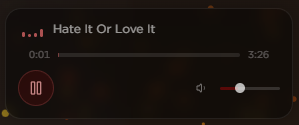
To add music to your link-in-bio page, upload an audio track and set it in the page's music player, then choose whether it starts on load or on a tap. On mychar.gg the music player is a built-in widget, so there is no embed code and no third-party player to manage. Here is the full process and the small rules that keep it from annoying visitors.
Add a track in the music player
Open the editor and add your audio in the music player. Once it is set, the player appears on your published page with the track ready to play. You can add more than one track depending on your plan, and reorder them so the one you want first plays first. 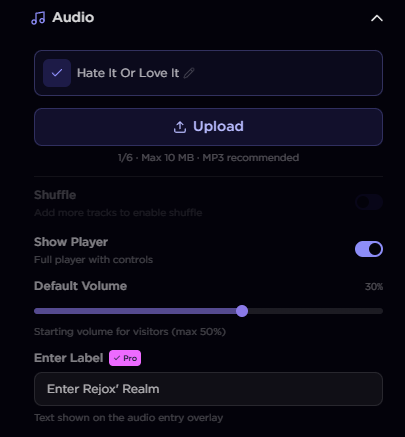
Autoplay, or tap to play
Browsers limit autoplay with sound, so a track often waits for the visitor's first interaction before it plays. Plan for that. Make the player easy to see so people can start it themselves, and do not rely on sound being on the moment the page loads. A visible player that a visitor chooses to start beats a track that fights the browser.
Pick the right track
The track sets the mood before anyone reads a word, so choose it with that in mind. A short loop or a calm track suits most pages. If you make music yourself, lead with your own release; it doubles as a preview. Keep the volume moderate, since visitors arrive with their system sound wherever they last left it.
Music etiquette
- Keep the volume moderate. Loud pages get muted or closed.
- Use one track as the default rather than a long playlist that hijacks the visit.
- Make sure the player is easy to pause.
- Only use audio you have the right to use.
Where music fits on the page
Music works best as one layer among a few. A background, a single animated effect, and a track that matches all pull in the same direction. For the full styling walkthrough, see how to make an aesthetic bio page. If you are an artist leading with a release, our guide for artists covers the sections that suit a music page.
Start building
The music player is part of the paid plans, and you can see what each plan includes on the pricing page. The getting-started guide covers account setup and your first links, and you can create your page for free to start.
Keep reading
The best bio link setup for Twitch streamers
How to set up a link-in-bio page that actually helps your stream: your Twitch and Discord front and center, clips on the page, and a schedule people can find.
September 15, 2026
How to make an aesthetic bio page: effects, music, and cursors
A step-by-step walkthrough for building an aesthetic link-in-bio page: layout, background effects, a music player, a custom cursor, and the small touches that make it feel designed.
August 10, 2026
The most customizable link-in-bio tools in 2026, compared
A side-by-side look at the link-in-bio tools you can actually design in 2026, from deep-customization pages to simple link lists, and how to pick one.
July 21, 2026