Link in bio for Discord communities: a complete setup
A complete setup for pointing people to your Discord: one link that shows the server, adds your rules and socials, and works from every platform you post on.


mychar.gg
October 1, 2026 · 2 min read
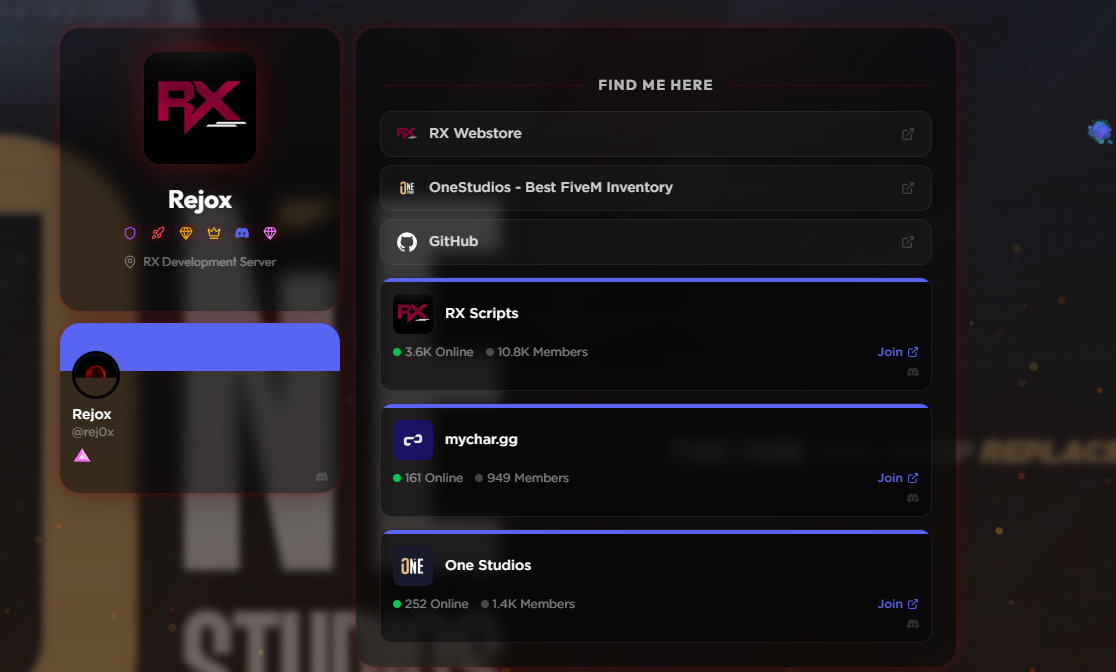
A link-in-bio page is a good home for a Discord community because it gives you one URL that shows the server, explains what it is, and links everything around it, without pasting a raw invite that expires or looks like spam. On mychar.gg you can embed your Discord server so people see it before they join, add your rules and other links, and keep the same URL across every platform. Here is a setup that works.
Lead with the server
Put the Discord front and center. mychar.gg can show your server as an embed, so a visitor sees the name, and a sense of the community, before they commit to joining. That preview does more for conversion than a bare invite link, because people join servers they can see rather than links they cannot.
Explain what the community is
A short, clear description under the server does a lot of work. Say who it is for and what happens there in a sentence or two. People decide fast whether a community is for them, so make that decision easy instead of making them join to find out.
Add the links around it
A community is rarely just the server. Add the socials, the site, the schedule, or the creator behind it so the page is a full picture rather than a single button. Keep the Discord at the top and let the rest support it. If you run events or streams, link those too.
Keep one link across platforms
The reason to use a page instead of a raw invite is that the page never changes. Put your mychar.gg link in your bios, your video descriptions, and your other servers, and update the page when things change instead of regenerating invites everywhere. Our guide for Discord covers the platform details, and the guide for communities and creators covers the wider setup.
See what works
The built-in analytics show how many people reach the page and what they click. If most visitors come from one platform, lean into it. If a link is ignored, remove it. Treating the page as something you tune, rather than set once, is what makes it earn its place.
Set it up
Connecting Discord and showing your profile is free. Showing your server invite as a live server card is part of Elite (a one-time €12.99), and Pro (a one-time €6.99) adds deeper analytics and custom links; you can compare them on the pricing page. The getting-started guide covers the basics, and you can create your page for free to start.
Keep reading
The best bio link setup for Twitch streamers
How to set up a link-in-bio page that actually helps your stream: your Twitch and Discord front and center, clips on the page, and a schedule people can find.
September 15, 2026
How to add music to your link-in-bio page
A short guide to adding background music to your link-in-bio page: uploading a track, setting it up in the music player, and the etiquette that keeps visitors from muting you.
September 13, 2026
How to make an aesthetic bio page: effects, music, and cursors
A step-by-step walkthrough for building an aesthetic link-in-bio page: layout, background effects, a music player, a custom cursor, and the small touches that make it feel designed.
August 10, 2026