The Builder
The builder is where you design your mychar.gg page. It gives you a split-screen interface: edit on the left, see your changes live on the right.
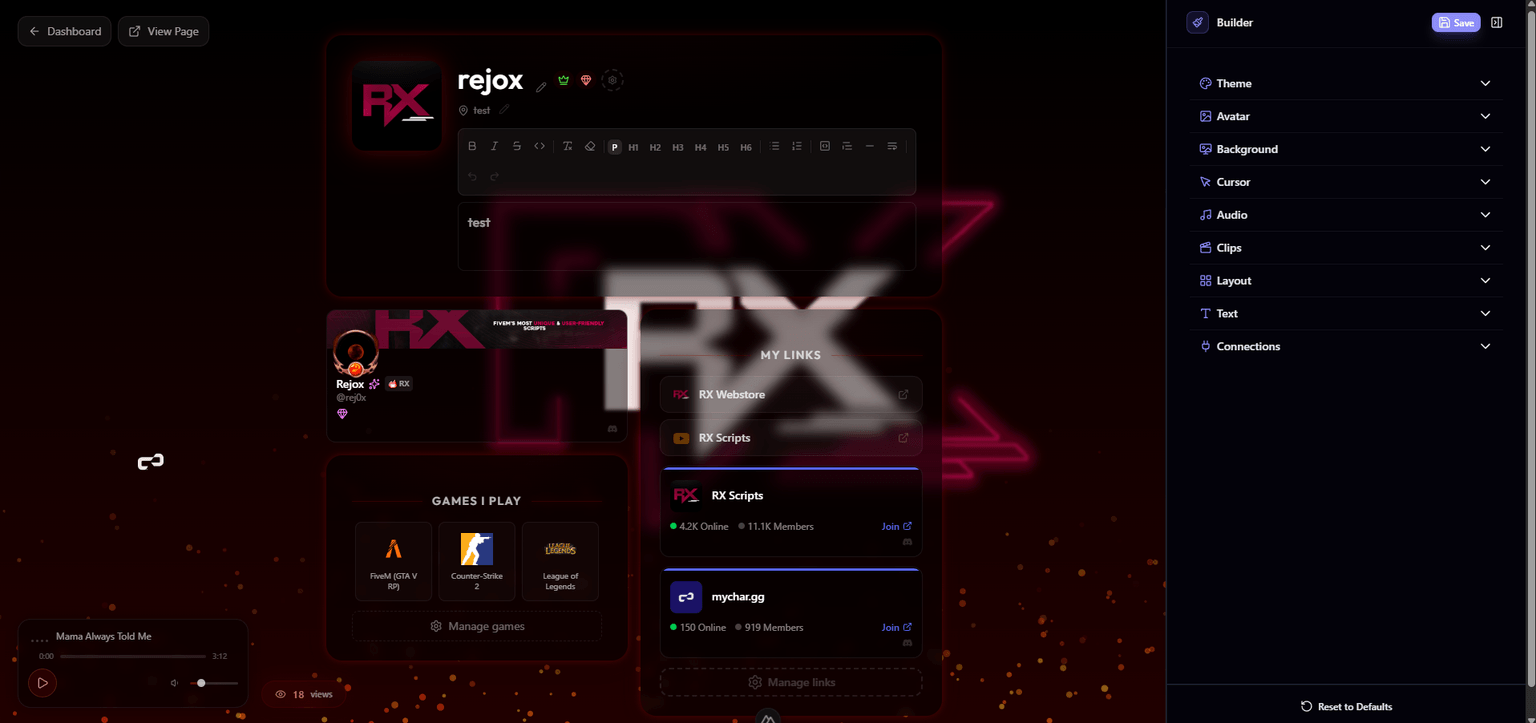
Opening the Builder
From your dashboard, click Customize Character (or navigate to /customize). The builder opens with your current page loaded.
How It Works
The builder sidebar on the left contains all your customization options, organized into sections:
| Section | What you can edit |
|---|---|
| Avatar | Upload and style your profile picture |
| Background | Background image, effects, blur, and gradient |
| Text | Font, size, weight, and text color |
| Theme | Primary color, card styles, icon styles |
| Layout | Choose your page layout, manage sections, and position widgets |
| Audio | Manage your music playlist and player settings |
| Clips | Upload and manage video clips |
| Cursor | Upload a custom cursor |
| Font | Upload custom fonts (Elite) |
| Links | Manage your links |
| Games | Manage your gaming profiles |
| Achievements | Manage achievement display |
| Connections | Discord integration settings |
The live preview on the right updates in real-time as you make changes, so you can see exactly what visitors will see.
Saving Changes
Click the Save button to apply your changes. The builder tracks unsaved changes and will warn you if you try to navigate away without saving.
Reset to Defaults
If you want to start fresh, you can reset your customization back to the default settings. This clears all your styling choices (backgrounds, colors, effects, etc.) but keeps your content (links, games, achievements).
My Setup
Show your gaming gear on your page: add items by category like PC, monitor, and keyboard, attach product links, and upload one setup photo.
Backgrounds & Effects
Upload image or video backgrounds up to 50 MB, adjust opacity, blur, and gradients, and add effects from rain on Pro to matrix rain on Elite.
Claim your username
Free forever. Your page is live in minutes.
- Free forever
- No credit card needed