Creating Your Account
How to sign up with Discord or email, verify your address, and claim a unique username of 3 to 20 characters that becomes your mychar.gg URL.
Sign Up
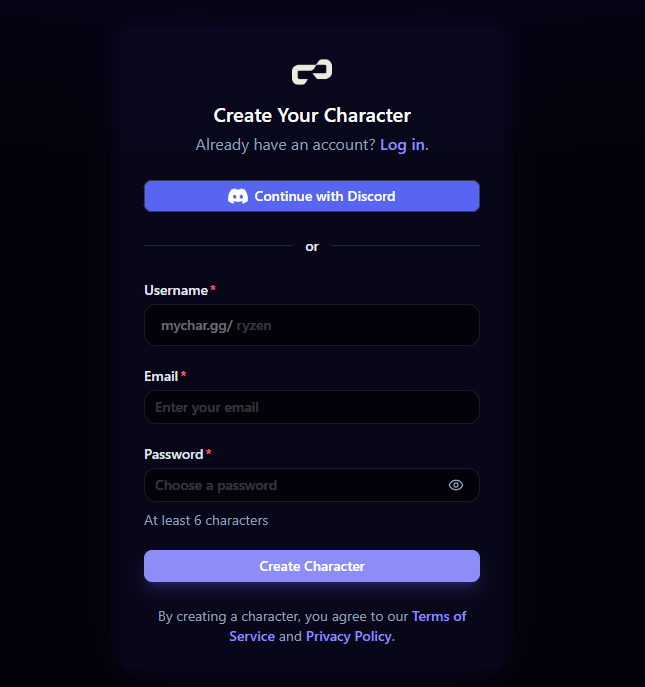
You can create a mychar.gg account in two ways:
- Discord (recommended): Click "Sign up with Discord" to use your existing Discord account. This is the fastest way to get started and lets you unlock Discord-based achievements later.
- Email & Password: Enter your email and choose a password. You'll receive a verification email to confirm your address.
Claim Your Username
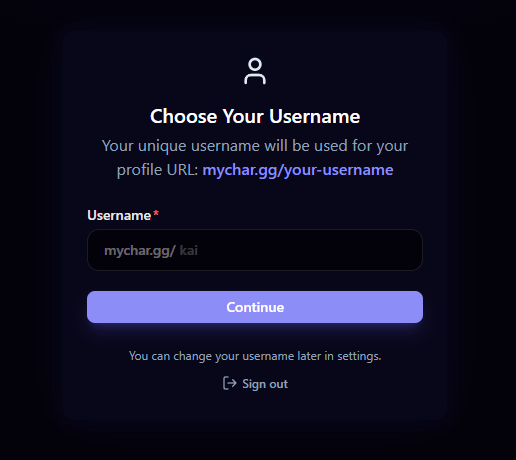
After signing up, you'll be asked to pick a username. Your username becomes your public URL:
mychar.gg/yourusername
Username rules:
- 3 to 20 characters long
- Lowercase letters, numbers, hyphens (
-), and underscores (_) only - Must be unique (no two users can have the same username)
Choose something memorable that matches the name people already know you by. You can change your username later from Account Settings.
After Signing Up
Once you've claimed your username, you'll land on your dashboard. You'll see an onboarding checklist with suggested steps to set up your page:
- Add your first link
- Upload an avatar
- Customize your page
You can dismiss the checklist at any time. Head to the builder to start making your page yours.
Welcome to mychar.gg
What mychar.gg is and what your page can hold: links, clips, music player, achievements, and skins, plus a four step quick start guide.
Your Dashboard
Tour of the mychar.gg dashboard: sidebar sections for the builder, analytics, skins, achievements, and settings, plus the onboarding checklist.
Claim your username
Free forever. Your page is live in minutes.
mychar.gg/
mia
- Free forever
- No credit card needed