Text & Fonts
Control the typography on your character page: font family, weight, scale, and more.
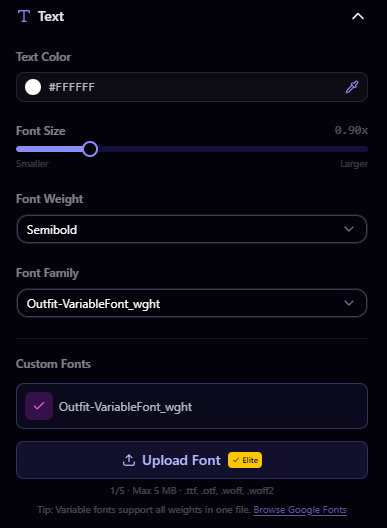
Font Family
Choose from a selection of built-in fonts. The default font is Rajdhani, a modern angular typeface. Additional system fonts are available to all users.
Font Weight
Adjust the thickness of your text. Options range from light to bold, depending on the font selected.
Font Scale
Control the overall text size on your page. Increase the scale for larger, more prominent text or decrease it for a more compact look.
Custom Fonts
Elite users can upload their own font files for a truly unique look.
Uploading a Custom Font
- Open the Font section in the builder sidebar
- Click Upload Font
- Select your font file
- Your custom font is added to your library and available for selection
Font File Requirements
| Property | Value |
|---|---|
| Max file size | 5 MB |
| Accepted formats | TTF, OTF, WOFF, WOFF2 |
| Max fonts | 5 |
Managing Custom Fonts
- Switch between your uploaded fonts and built-in fonts at any time
- Delete fonts you no longer need to free up slots
Cards & Layout
Choose from four page layouts including the Elite grid, style card borders, animations, and hover effects, and rename section titles on Pro.
Custom Cursors
Upload custom cursors for your page on Pro or Elite: PNG, SVG, GIF, or ICO files up to 5 MB, with a library of 3 to 10 cursors by plan.
Claim your username
Free forever. Your page is live in minutes.
- Free forever
- No credit card needed