Links
Links are the core of your mychar.gg page. Add your social media, gaming platforms, streaming channels, and any custom URLs so visitors can find you everywhere.
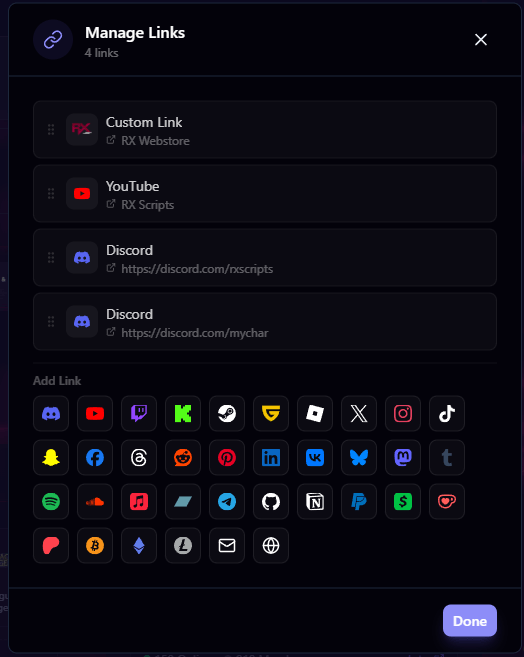
Adding a Link
- Go to Customize from your dashboard
- Click Manage Links in the builder sidebar
- Click Add Link
- Choose a predefined link type (e.g., Twitch, Discord, Twitter) or create a custom link
- Enter the URL or value and save
Predefined vs. Custom Links
Predefined links come with a built-in icon and label for popular platforms. When you select a predefined type, the icon is automatically applied and the field validates your input accordingly.
Custom links let you link to anything. You provide:
- A label (what visitors see)
- A URL (where the link goes)
- An optional custom icon (upload your own image)
Link Limits
| Plan | Custom Links |
|---|---|
| Free | 0 |
| Pro | 3 |
| Elite | Unlimited |
Managing Your Links
Reorder Links
Drag and drop links to change the order they appear on your profile. The order in the editor is the order visitors see.
Custom Icons
Upload a custom icon for any link to replace the default platform icon. Click the icon area on a link to upload your own image.
Delete Links
Click the delete button on any link to remove it from your profile.
Link Display Style
In the builder's theme settings, you can control how links appear on your page:
- Icon only: Shows just the link icon
- Icon + Label: Shows the icon alongside the link name
- Label only: Shows just the text label
Show as Embed
Elite users can enable embed previews on individual links. When enabled, the link displays a rich embed preview (similar to how links appear in Discord) instead of the standard link button.
Display Name, Bio & Pronouns
Set your display name, bio, pronouns, and location in the builder. Display name and rich HTML bios need Pro, pronouns are free on every plan.
Games
Add games from the catalog with your in-game handle so visitors can find you, then reorder, edit, or remove them from the builder at any time.
Claim your username
Free forever. Your page is live in minutes.
- Free forever
- No credit card needed