Video Clips
Upload gameplay clips up to 50 MB in MP4, WebM, or MOV on Pro (6 clips) or Elite (18), with titles, reordering, and a built-in player modal.
Video clips are a Pro and Elite feature. Free plan users cannot upload clips.
Showcase your best gameplay moments, highlights, and clips directly on your mychar.gg profile. Visitors can watch them in a built-in player.
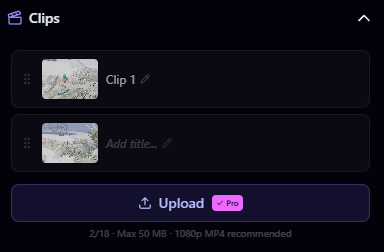
Uploading a Clip
- Go to Customize from your dashboard
- Open the Clips section in the builder sidebar
- Click Upload or drag and drop your video file
- Add a title and optional description
- Save
File Requirements
| Property | Value |
|---|---|
| Max file size | 50 MB |
| Accepted formats | MP4, WebM, MOV |
| Recommended quality | 1080p |
Clip Limits
| Plan | Max Clips |
|---|---|
| Free | 0 (not available) |
| Pro | 6 |
| Elite | 18 |
Managing Clips
- Reorder: Drag clips to set the display order on your profile
- Edit: Update the title or description of any clip
- Delete: Remove a clip from your profile and free up a slot
How Clips Display
On your public profile, clips appear as thumbnails in a gallery. When a visitor clicks a clip, it opens in a player modal where they can watch the full video.
Achievements
How achievements work: claim Discord member and booster badges or donation achievements via Stripe, then choose which ones your page displays.
Audio & Music
Add background music with the built-in music player: upload MP3 or WAV tracks up to 10 MB, reorder your playlist, and set shuffle and volume.
Claim your username
Free forever. Your page is live in minutes.
mychar.gg/
mia
- Free forever
- No credit card needed