Usage & File Limits
This page covers all upload limits, file restrictions, and what happens when you hit a limit or downgrade your plan.
Upload Limits by Plan
| Resource | Free | Pro | Elite |
|---|---|---|---|
| Custom Links | 0 | 3 | Unlimited |
| Avatars | 2 | 10 | 25 |
| Backgrounds | 1 | 5 | 15 |
| Custom Cursors | 0 | 3 | 10 |
| Audio Tracks | 1 | 3 | 6 |
| Video Clips | 0 | 6 | 18 |
| Custom Fonts | 0 | 0 | 5 |
File Size Limits
These limits apply to all plans:
| Upload Type | Max Size | Recommended |
|---|---|---|
| Avatar | 5 MB | 256 × 256 px |
| Background (image) | 50 MB | 1920 × 1080 px |
| Background (video) | 50 MB | 1080p MP4/WebM |
| Custom Cursor | 5 MB | 32 × 32 or 64 × 64 px |
| Audio Track | 10 MB | MP3 format |
| Video Clip | 50 MB | 1080p MP4 |
| Custom Font | 5 MB | - |
Accepted File Types
| Upload Type | Accepted Formats |
|---|---|
| Avatar | JPEG, PNG, WebP, GIF |
| Background | JPEG, PNG, WebP, GIF, MP4, WebM Video: Pro+ |
| Custom Cursor | PNG, SVG, GIF, ICO |
| Audio Track | MP3, WAV, OGG, FLAC, AAC, M4A |
| Video Clip | MP4, WebM, MOV |
| Custom Font | TTF, OTF, WOFF, WOFF2 |
Checking Your Usage
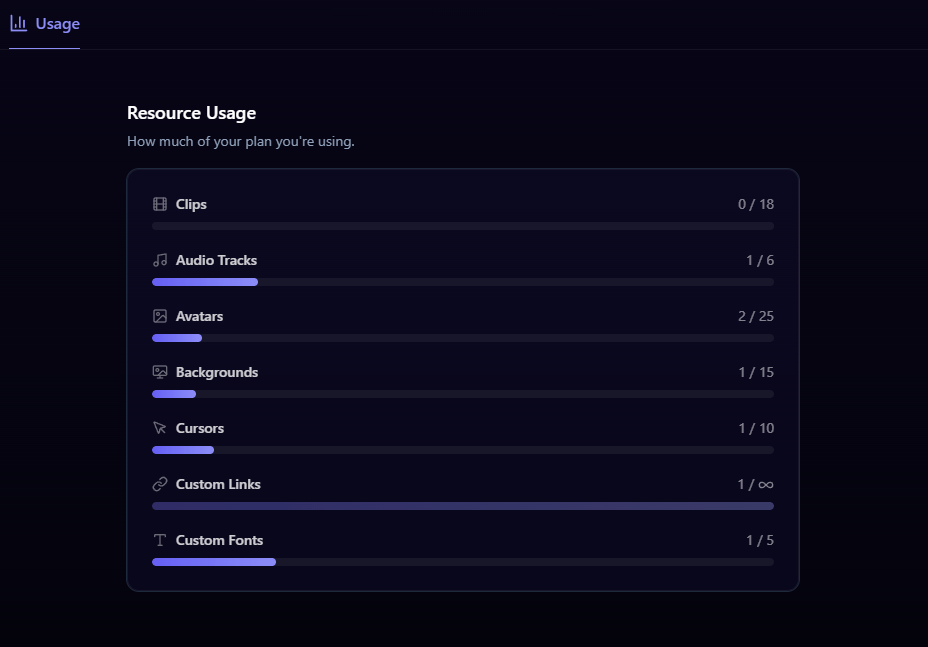
Go to Settings → Usage to see how many files you've uploaded versus your plan limits for each category.
What Happens When You Hit a Limit
When you've reached the maximum for a resource type:
- You cannot upload more files of that type
- You'll see a message indicating you've hit the limit
- To free up space, delete existing files or upgrade your plan
Downgrading & Grace Period
When you downgrade (or your subscription expires), a 7-day grace period begins:
- During the grace period, your existing files are preserved even if they exceed the new plan's limits
- You cannot upload new files that exceed the lower plan's limits
- Pro-only features like video backgrounds are locked immediately on downgrade
- After the 7-day grace period ends, files above the new plan's limits may be removed
The downgrade preview on the billing page shows which files would be affected so you can prepare accordingly.
Billing
Manage billing from your dashboard settings: view your current plan, cancel or resubscribe, and update payment methods via the Stripe portal.
Statistics & Analytics
What mychar.gg analytics track: page views, clicks per link, and views over time, with live visitors and country data on Pro and Elite plans.
Claim your username
Free forever. Your page is live in minutes.
- Free forever
- No credit card needed