Backgrounds & Effects
Customize your page's look with background images, videos, and animated effects.
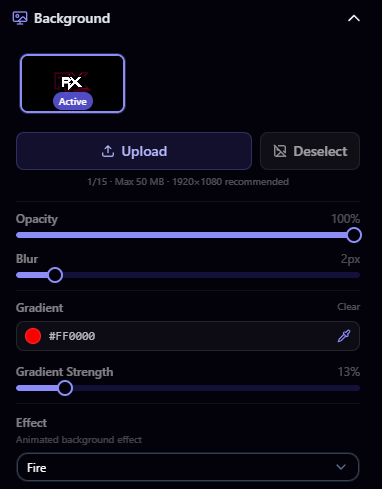
Uploading a Background
- Open the builder and go to the Background section
- Click Upload or drag and drop your file
- Your background is saved to your library and set as active
File Requirements
| Property | Images | Videos |
|---|---|---|
| Max file size | 50 MB | 50 MB |
| Accepted formats | JPEG, PNG, WebP, GIF | MP4, WebM |
| Recommended size | 1920 × 1080 px | 1920 × 1080 px |
Background Limits
| Plan | Max Backgrounds | Video Backgrounds |
|---|---|---|
| Free | 1 | No |
| Pro | 5 | Yes |
| Elite | 15 | Yes |
You can store multiple backgrounds and switch between them at any time.
Video Backgrounds Pro
Pro and Elite users can upload video backgrounds (MP4 or WebM). Videos play automatically, are muted, and loop continuously.
- Videos are silent - there is no audio playback from video backgrounds
- All background adjustments (opacity, blur) and gradient overlays work with videos just like with images
- Background effects can be layered on top of video backgrounds
Background Adjustments
Fine-tune how your background looks:
- Opacity: Control the transparency of your background image (0–100%)
- Blur: Apply a blur effect to soften the image (0–20px)
Gradient Overlay Pro
Pro and Elite users can add a gradient overlay on top of their background:
- Gradient Color: Pick a color for the gradient using the color picker
- Gradient Opacity: Control how visible the gradient is
This is useful for ensuring your text remains readable over busy background images.
Background Effects Pro
Animated effects add life to your page. Effects are available on Pro and Elite. Select an effect from the dropdown in the background settings.
Pro Effects
| Effect | Description |
|---|---|
| Rain | Animated falling rain drops |
| Snowfall | Animated snowflakes |
| Floating Particles | Floating particle animation |
| Starfield | Animated star field |
| Fire | Fire animation effect |
| Fireflies | Animated fireflies |
| Smoke | Smoke animation |
Elite Exclusive Effects
Everything in Pro, plus:
| Effect | Description |
|---|---|
| Matrix Rain | Matrix-style falling code |
| Glitch | Digital glitch effect |
| Sparks | Spark particle effect |
| Sakura | Cherry blossom petals |
| Plasma | Plasma animation |
| Lasers | Laser beam animation |
The Builder
How the builder works: a split-screen editor with live preview, sidebar sections for backgrounds, text, theme, and layout, and a reset option.
Colors & Theme
Pick your primary color, text color, and card background with opacity and blur for a frosted glass look, plus icon styles by plan tier.
Claim your username
Free forever. Your page is live in minutes.
- Free forever
- No credit card needed