Cards & Layout
Page Layout
Choose how your profile content is arranged. Four layouts are available:
Free Layouts
| Layout | Description |
|---|---|
| Default | Centered column with avatar on top, content stacked vertically below |
| Compact | Avatar beside your name in a horizontal header, content below |
Pro Layouts
| Layout | Description |
|---|---|
| Split | Two-column layout with profile info on the left and content sections on the right |
Elite Layouts
| Layout | Description |
|---|---|
| Grid | Wide header with avatar and name, sections displayed in a 2-column grid |
Card Styling
Cards are the containers that hold each section of your page. You can customize their appearance:
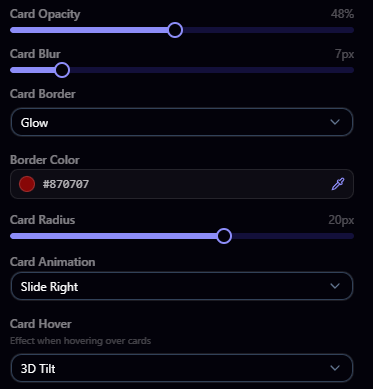
Border
- Style: None, subtle, solid, dashed, or dotted
- Color: Pick any border color
- Radius: Adjust how rounded the card corners are
Animations
Add animations to your cards. Choose from available animation presets to add motion when visitors load your page.
Hover Effects
Set what happens when visitors hover over your cards. Choose from available hover effect presets for interactive feedback.
Section Visibility & Order
From the builder, you can:
- Toggle sections on and off to hide any section you don't want to display
- Reorder sections by dragging them into the order you prefer Pro+
- Show/hide section titles to choose whether section headings are visible
Custom Section Titles
Rename any section heading on your profile to something more personal. For example, change "Games I Play" to "My Gaming Collection" or "My Links" to "Connect With Me".
How to Edit
- Go to Customize from your dashboard
- Make sure Show section titles is enabled in the builder sidebar
- Click directly on any section title in the live preview
- Type your custom title and press Enter or click away to confirm
- Save your changes
Default Titles
If you leave a title empty, it falls back to the default:
| Section | Default Title |
|---|---|
| Links | My Links |
| Games | Games I Play |
| Clips | My Clips |
| Setup | My Setup |
Limits
- Maximum 30 characters per title
- If your plan expires, section titles revert to defaults on the customize page but your custom titles are preserved for when you resubscribe
Colors & Theme
Pick your primary color, text color, and card background with opacity and blur for a frosted glass look, plus icon styles by plan tier.
Text & Fonts
Change the font family, weight, and scale of your page text. Elite users can upload up to 5 custom fonts in TTF, OTF, WOFF, or WOFF2 format.
Claim your username
Free forever. Your page is live in minutes.
- Free forever
- No credit card needed