Audio & Music
Add background music with the built-in music player: upload MP3 or WAV tracks up to 10 MB, reorder your playlist, and set shuffle and volume.
Add background music to your mychar.gg page. When visitors open your profile, they can listen to your playlist with the built-in audio player.
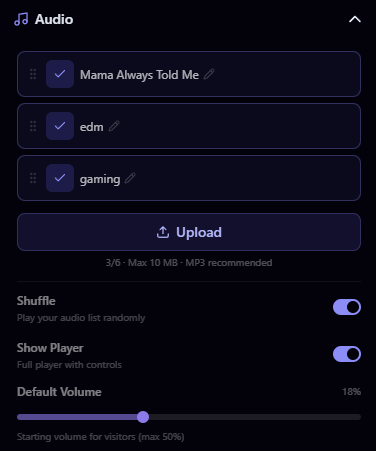
Uploading Audio
- Go to Customize from your dashboard
- Open the Audio section in the builder sidebar
- Click Upload or drag and drop your audio file
- Your track is added to your playlist
File Requirements
| Property | Value |
|---|---|
| Max file size | 10 MB |
| Accepted formats | MP3, WAV, OGG, FLAC, AAC, M4A |
MP3 is the most widely supported format and generally has the smallest file size. Stick with MP3 if you're unsure.
Audio Limits
| Plan | Max Tracks |
|---|---|
| Free | 1 |
| Pro | 3 |
| Elite | 6 |
Managing Your Playlist
- Reorder: Drag tracks to set the playback order
- Delete: Remove a track from your playlist
Player Settings
In the builder, you can configure how the audio player behaves:
- Shuffle: Enable shuffle mode to randomize track order
- Volume: Set the default volume level for visitors
- Show / Hide Player: Toggle whether the audio player is visible on your page. When hidden, audio still plays but visitors won't see player controls.
Be mindful of copyright. Only upload audio you have the right to use. See the Acceptable Use Policy for details.
Claim your username
Free forever. Your page is live in minutes.
mychar.gg/
mia
- Free forever
- No credit card needed