Your Dashboard
Your dashboard is your home base on mychar.gg. From here you can customize your page, view statistics, browse skins, manage achievements, and update your settings.
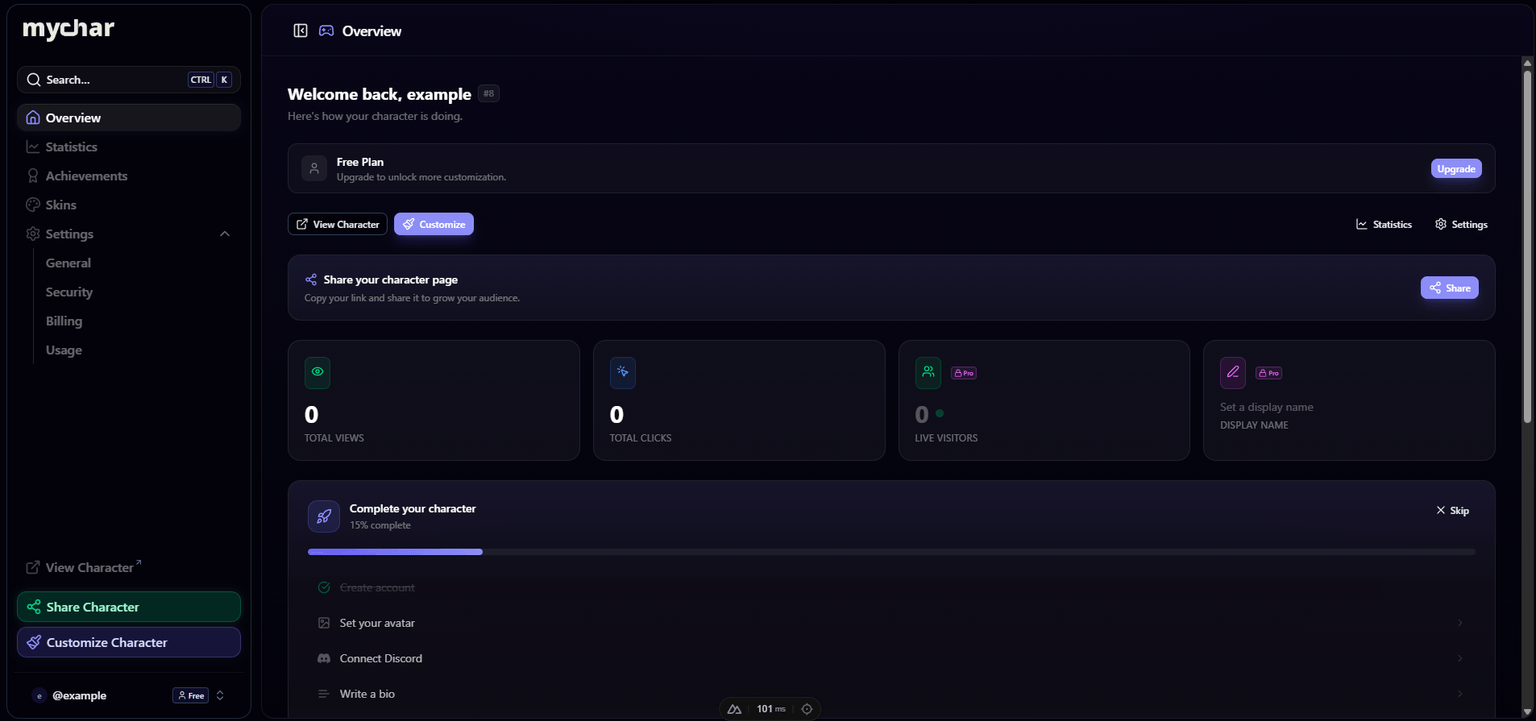
Sidebar Navigation
The sidebar on the left gives you quick access to every section:
| Section | What it does |
|---|---|
| Home | Dashboard overview with your onboarding checklist and quick actions |
| Customize | Open the builder to edit your character page |
| Statistics | View your page views, link clicks, and analytics |
| Skins | Browse and apply community-created theme presets |
| Achievements | View available achievements and claim the ones you've earned |
| Settings | Manage your account, billing, security, and usage |
Quick Actions
From the dashboard home, you can:
- Visit your page: Open your public profile at
mychar.gg/yourusername - Customize: Jump straight into the builder
- Share: Copy your profile URL
Onboarding Checklist
New accounts see a checklist of suggested setup steps. Complete them at your own pace or dismiss the checklist entirely. It's just there to help you get started.
Creating Your Account
How to sign up with Discord or email, verify your address, and claim a unique username of 3 to 20 characters that becomes your mychar.gg URL.
Sharing Your Page
Where to share your mychar.gg page URL, from Discord bios and Twitch panels to Instagram and TikTok, with tips for picking a memorable username.
Claim your username
Free forever. Your page is live in minutes.
- Free forever
- No credit card needed